Vow vs Cold Turkey: a simpler Cold Turkey alternative for Mac
Last updated:
Cold Turkey blocks the sites and apps on your lists, using browser extensions and a background agent, on Mac and Windows. Vow turns off your Mac's whole internet connection until a timer ends, with no extensions and nothing to set up. Pick Cold Turkey for detailed control. Pick Vow for total quiet, for $9.99 once.
The short verdict
Choose Cold Turkey if…
- You also use Windows and want the same blocker on both.
- You want fine control: specific sites and apps, exceptions, scheduled breaks and allowances.
- You only need website blocking, which Cold Turkey's free version covers.
Choose Vow if…
- You want every app offline, not only browsers, without apps being force-quit.
- You don't want browser extensions that see every URL you visit.
- You'd rather not maintain lists of sites, apps and exceptions.
- You want a lower one-time price: $9.99 instead of $45.
Vow vs Cold Turkey, side by side
| Vow | Cold Turkey | |
|---|---|---|
| What it stops | The whole internet: every browser, app and terminal tool goes quiet at once | Sites and apps on your lists (or all websites via *.*) |
| How it works | Turns off the Mac's network connections using built-in macOS tools | Browser extensions check every URL + a background agent quits blocked apps |
| Browser extensions | None. Works in every browser and never sees what sites you visit | Required for website blocking (quits browsers without it; logs site stats by default) |
| Non-browser apps (Discord, Telegram, WhatsApp, Mail) | All offline automatically. Apps stay open, so you can read old messages, with zero new pings | Website blocks (*.*) only work in browsers; stopping an app requires Pro and force-quits the app |
| Network settings & VPNs | Clean. Never touches proxies, /etc/hosts or DNS, and restores your exact pre-session state | Does not modify system proxies or VPN settings |
| Localhost and dev tools | Always work (loopback stays up; local containers work via localhost ports) | Needs manual Website Exceptions for localhost when blocking all sites (*.*) |
| Lists to keep up to date | None | Yes (websites, apps, exceptions and extensions) |
| If you quit the app | Nothing changes. A system helper holds the timer across quit and restart | Background agent respawns automatically; extensions close browsers if stopped |
| If an emergency happens | Built-in 15-minute cooldown: stops impulses, but never traps you in a real emergency | Configurable breaks/delays in Pro, or locked until the timer ends |
| Account needed | No. 100% local on your Mac | No (stored locally) |
| Price | $9.99 once (3 free sessions) | $45 once for Pro (free version is websites only) |
| Runs on | Mac only (macOS 26 or later, Apple Silicon) | Mac and Windows |
How blocking works differently
Cold Turkey is a detailed blocker. Browser extensions check every URL against your lists, and a background agent quits apps you've blocked. Even its block-everything mode (*.*) only applies inside browsers. Messaging apps like Discord or Mail are stopped by force-quitting them, which requires Pro.
Vow works one level lower. It turns off your Mac's network connections using built-in macOS tools, so every app and browser loses its connection at once, and no extension is involved. Your apps stay open, so you can still read old messages and finish a draft offline. Nothing new comes in until the session ends.
Staying locked
Cold Turkey is hard to get around: its background agent respawns if you quit it, and its extensions close browsers if they're disabled. With Pro you can set breaks and delays, or lock a block until it ends.
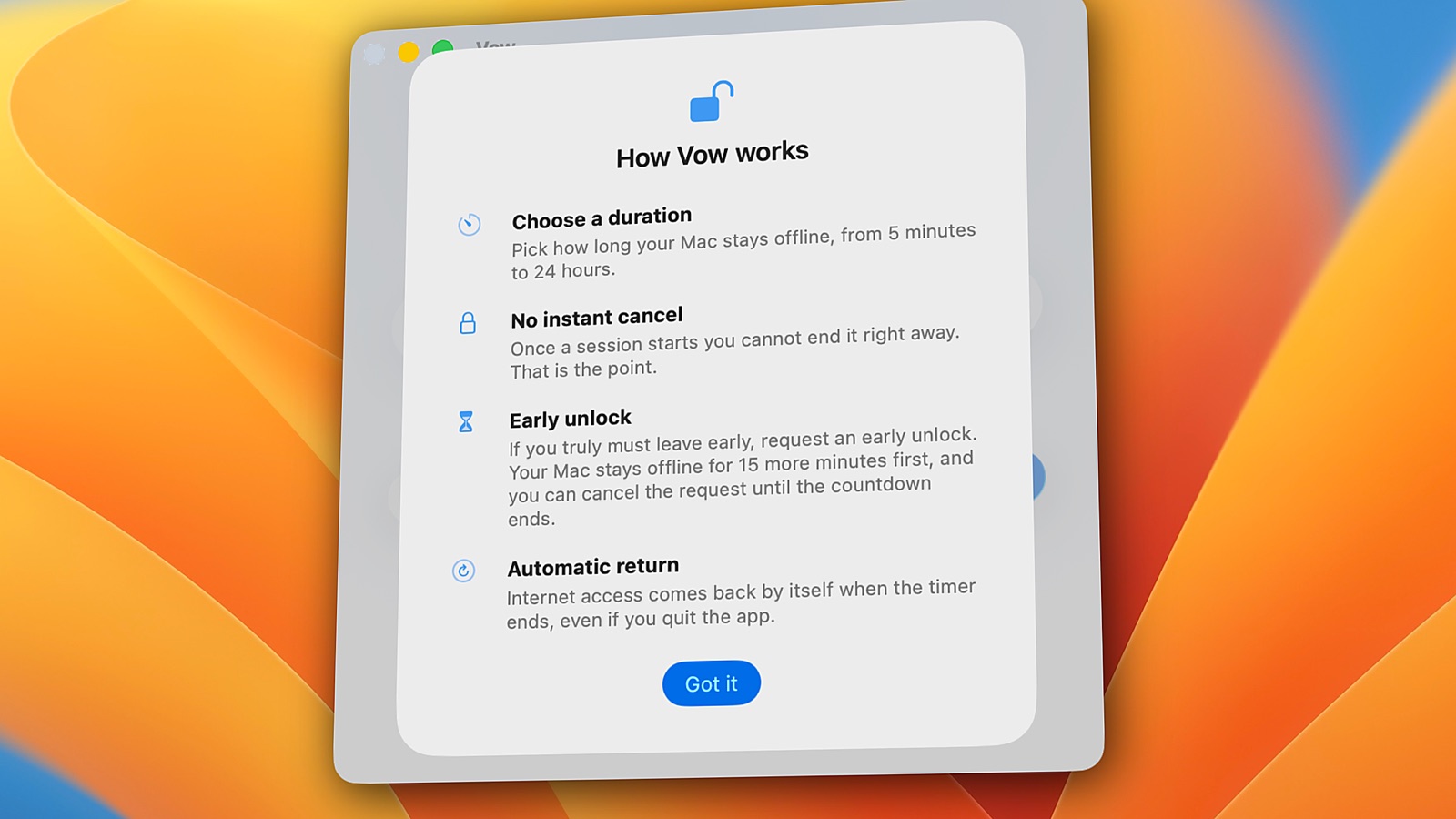
Vow is just as hard to undo, with one deliberate exception. A system helper holds the timer across quit and restart, and there's no cancel button. If you have a real emergency, you can request an early unlock: your Mac stays offline for 15 more minutes first, and then the internet comes back. You're never trapped.
Price
Cold Turkey's free version blocks websites. Pro, which adds app blocking and more, is $45 once. Vow is $9.99 once for up to 2 personal Macs, with all 1.x updates included and 3 free sessions to try it first.
Switching from Cold Turkey to Vow
- No lists to move. Vow takes the whole Mac offline.
- No extensions to install in Safari, Chrome, Firefox or any other browser.
- Recreate scheduled blocks as Vow schedules, such as Monday to Friday at 18:00 for 1 hour.
- Developers: you don't need localhost exceptions. Loopback stays up during a session.
Questions
Is Vow a good Cold Turkey alternative for Mac?
Yes, if you want your whole Mac offline rather than a list of sites and apps blocked. Vow turns off every network connection until your timer ends, without browser extensions, and costs $9.99 once instead of $45 for Cold Turkey Pro.
Does Vow need browser extensions like Cold Turkey?
No. Vow turns off your Mac's network connections, so it works in every browser automatically and never sees which sites you visit.
Does Vow force-quit my apps?
No. Your apps stay open during a session, so you can read old messages and keep working offline. They just can't connect to the internet until the timer ends.
Can Vow block just some websites?
No. Vow blocks the whole internet. If you want to block specific sites and keep the rest, Cold Turkey or Freedom is the better choice.
Try Vow free
Vow is a Mac app that turns off your internet and keeps it off until your timer ends, from 5 minutes to 24 hours. Try 3 full sessions free, then pay $9.99 once. Requires macOS 26 or later on Apple Silicon.